> CASE_STUDY · DATAX.AI · 2025

When read-only
wasn't good enough.

Designing a two-role edit and review workflow for the B2B Digital Catalogue, because AI can't fix bad data at the source.

Role: Product Designer Tool: Figma Status: In Development
The best products don't fight their constraints. They design within them.
When AI can't fix a problem, the answer isn't a smarter algorithm.
It's giving humans the right tools.

Better AI couldn't solve
a data quality problem at the source.

The B2B Digital Catalogue relied on AI enrichment to populate product attributes. But enrichment was only as good as the source data. Data coming in from client funnels was incomplete, inconsistent, and often wrong. The result: catalogue records full of bad data, and no way for anyone to fix it.

AI enrichment failed.

The model could only work with what it was given. Bad input meant bad output, consistently.

Source data was poor.

Data arrived from multiple client funnels, incomplete, inconsistent, missing key attributes.

Clients had no way to fix it.

Attributes on the PDP were read-only. No edit button. No escalation path. No self-serve correction.

We could've trained a better model. None of it would've worked. The problem wasn't the AI.

The fix wasn't smarter automation.
It was structured human input.

Retraining the model, adding data sources, tweaking thresholds, none of it addressed the root cause. No human could correct what the AI got wrong. The data entered the system incorrect and stayed incorrect. The solution required giving clients the ability to fix attributes directly, with governance to ensure quality and a review layer to prevent new errors.

One product. Two roles.
One shared outcome.

Both roles are client-side, this is a self-serve workflow. The separation ensures no single user can submit and approve their own changes, maintaining data integrity without requiring internal oversight.

EDITOR

Makes the edits.

Client-side user who identifies incorrect attributes and submits corrections. Works inline on the PDP.

REVIEWER

Approves or rejects.

Reviews submitted edits with full context. Can approve all or reject with field-level comments explaining exactly what needs fixing.

Separation of roles. Shared accountability for cleaner data.

The constraints weren't obstacles.
They were the design brief.

Before touching Figma, I mapped every backend constraint, every system boundary, and every edge case. The edit feature sat at the intersection of multiple products, each with their own data ownership rules.

Specifications, owned by MMA (separate product). Cannot be edited here.

Classification path, owned by Taxonomy (another product). Read-only in this flow.

Adding new attributes, introduces data governance issues. Not in Phase 1 scope.

Partial acceptance, backend limitation. Reviewer must accept all or reject all in Phase 1.

Phase 1 ships what's safe. Phase 2 expands what's possible.

The decision that changed
after client feedback.

The reviewer experience went through multiple iterations. Early designs allowed reviewers to accept or reject a submission as a whole with a single comment. After a client demo the feedback was clear: "How will the editor know what specifically to change?" Editors were re-submitting with the same issues because they couldn't tell which fields were wrong.

BEFORE, Single rejection
  • Single accept/reject on entire submission
  • One comment field for reviewer notes
  • Editor receives vague feedback
  • Multiple re-submission loops with same errors
AFTER, Field-level rejection
  • Reject checkbox per field
  • Comment box reveals only when field is flagged
  • Editor knows exactly which field to fix
  • Fewer re-submission cycles

The best iterations come from real users, not internal reviews. Good rejections teach.

> CHAPTER · EDITOR FLOW

Inline editing. Field-level control.
Within boundaries.

From read-only to editable
in one click.

The edit flow begins on the Product Details Page, the same page where incorrect data lives. No navigation to a separate editing interface, no context switch. The edit button lives where the problem is visible.
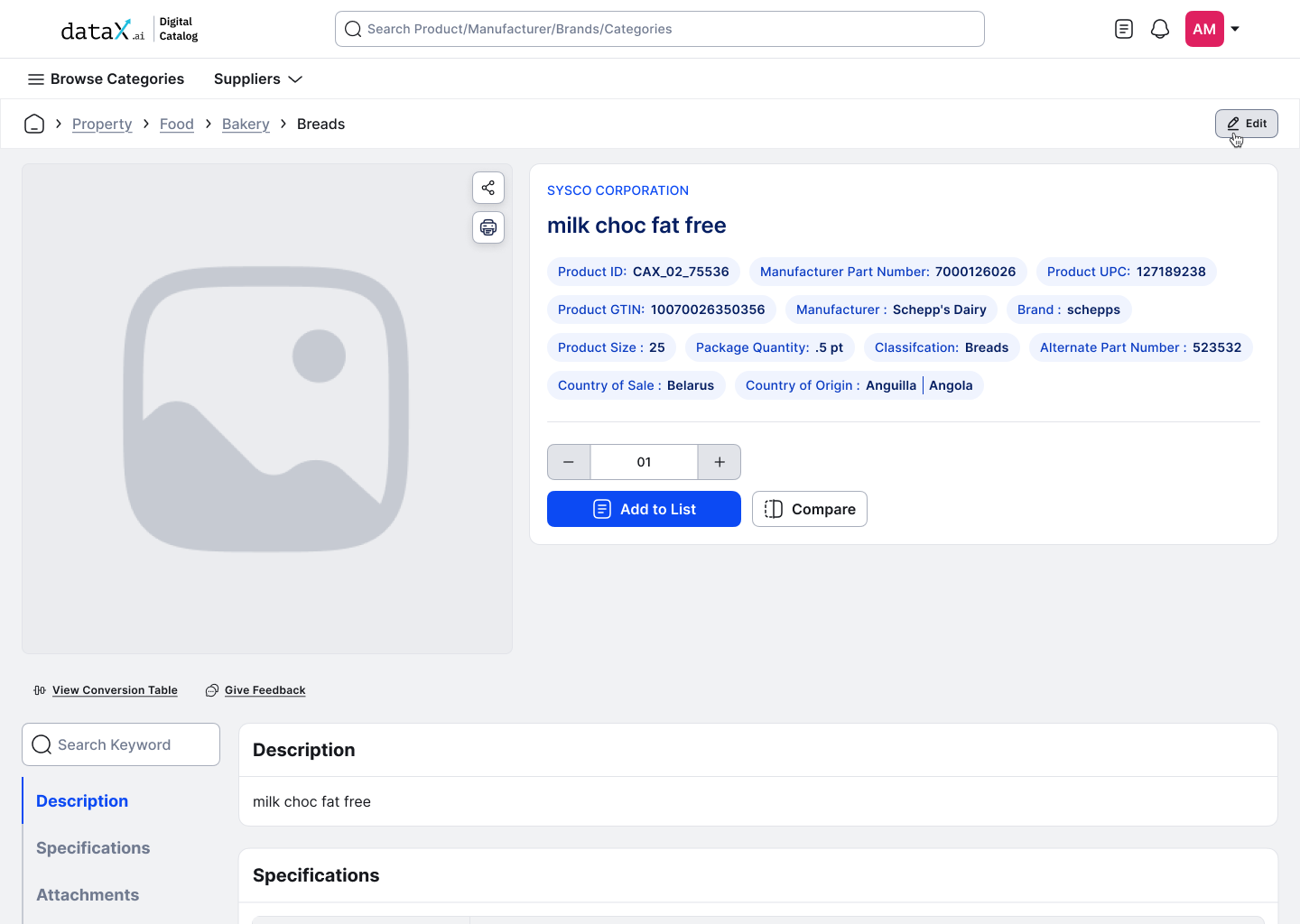
PDP page, Edit button triggered from product details, permission-aware
EF-01 · PDP TRIGGER PDP page, Edit button triggered from product details, permission-aware
PDP page, Edit button triggered from product details, permission-aware.

Editing lives where the data lives.
Inline editing. Field-level control.
Within boundaries.

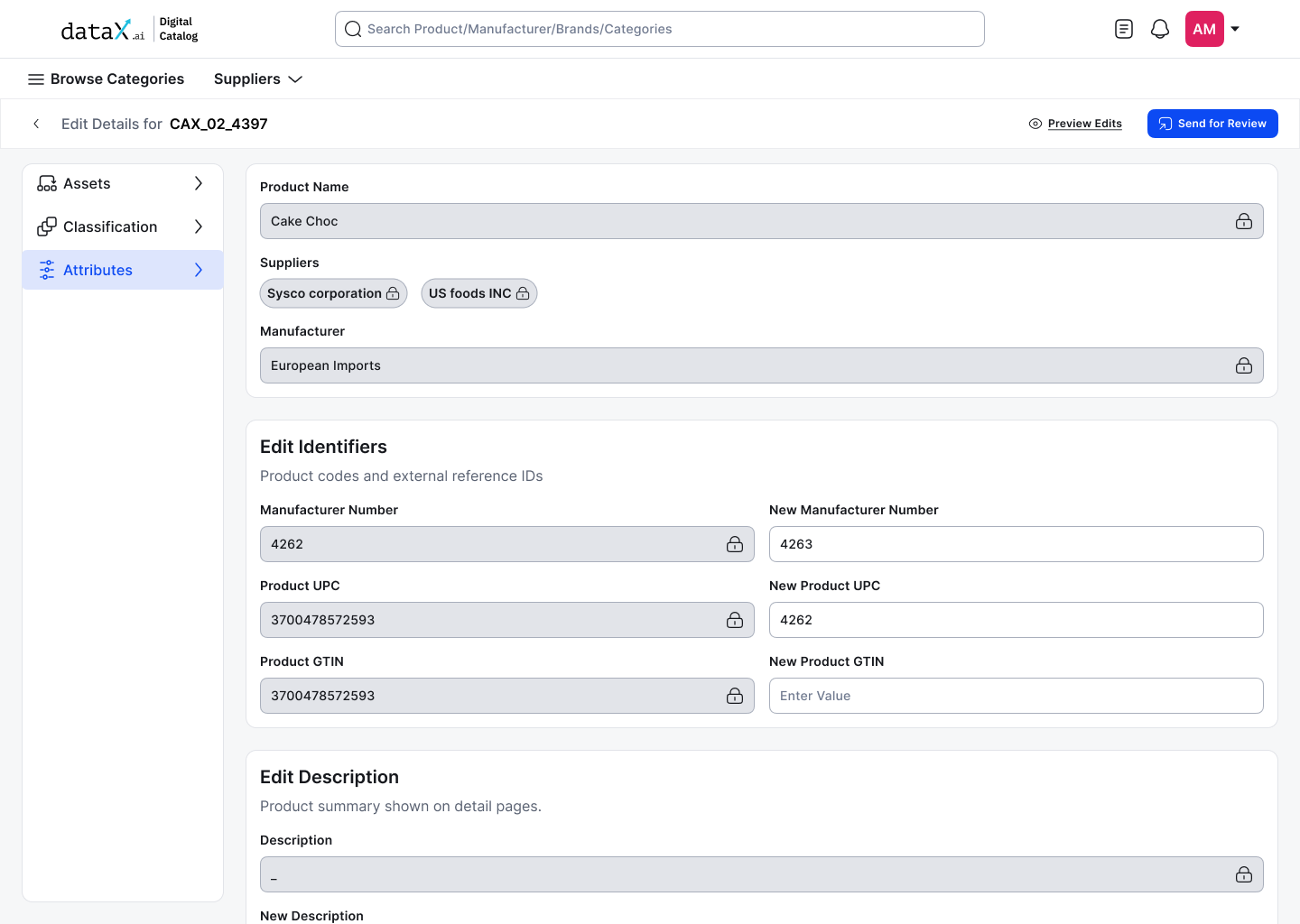
Not all attributes can be edited here. Backend constraints, data ownership across products, and governance requirements all shape the scope. Clear boundaries reduce error surface, and tell users exactly where to go when something can't be fixed here.

Edit attributes screen, editable fields inline, locked fields clearly marked
EF-02 · EDIT ATTRIBUTES Edit attributes screen, editable fields inline, locked fields clearly marked
Edit attributes screen, editable fields inline, locked fields clearly marked.
✓ Editable in this flow
Manufacturer
Brand
Pack size
Country of sale
SKU ID
Product images
✗ Locked, why
Specifications
Owned by MMA product
Classification path
Owned by Taxonomy product
Custom attributes
Governance issues
Adding new fields
Not in Phase 1 scope

Boundaries are a feature, not a limitation.

Review your own work first.

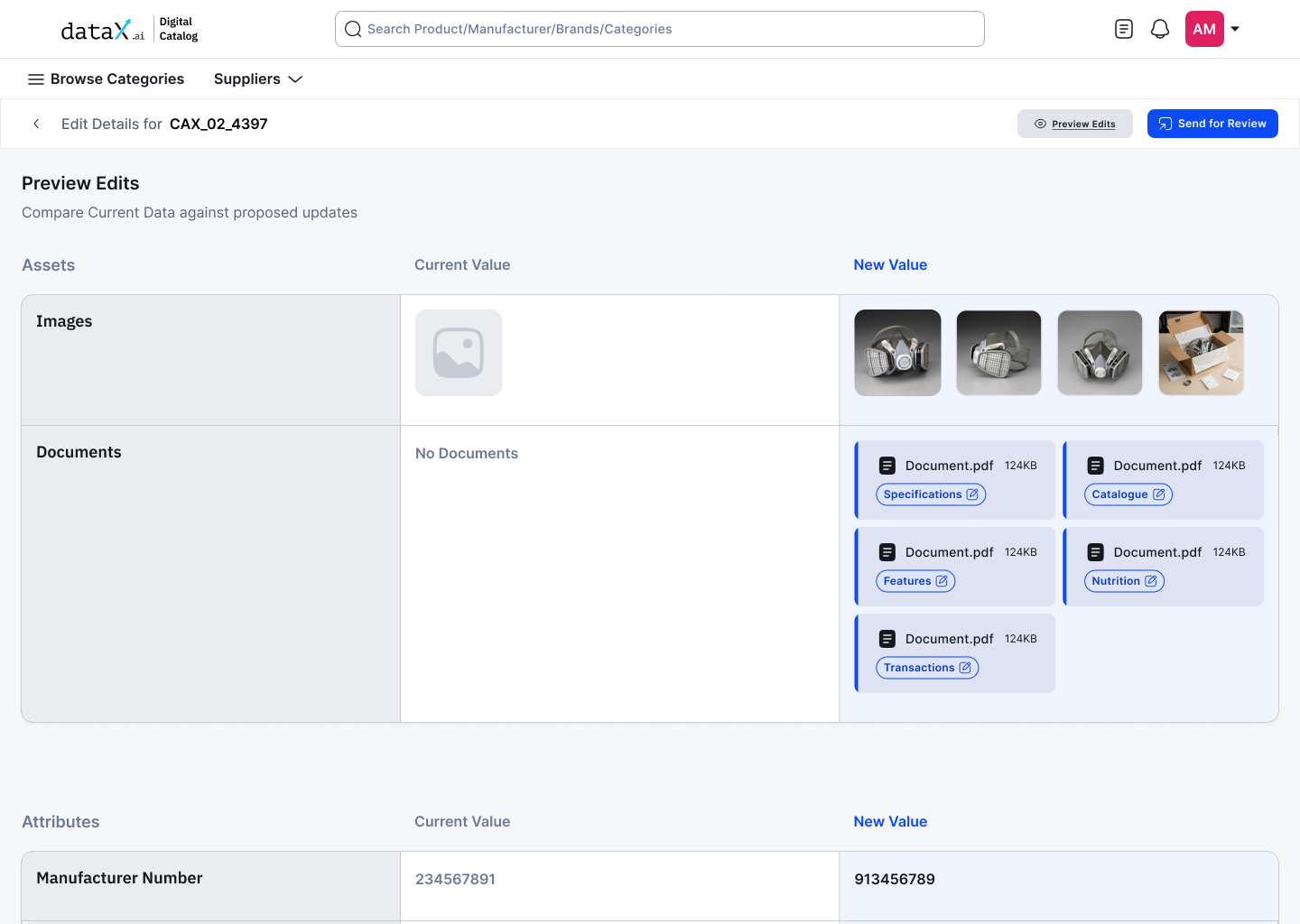
The reviewer reviews the result, not the typos.

Preview edits, original vs edited values side by side before submission
EF-03 · PREVIEW EDITS Preview edits, original vs edited values side by side before submission
Preview edits, original vs edited values side by side before submission.

Approve, reject,
or guide.

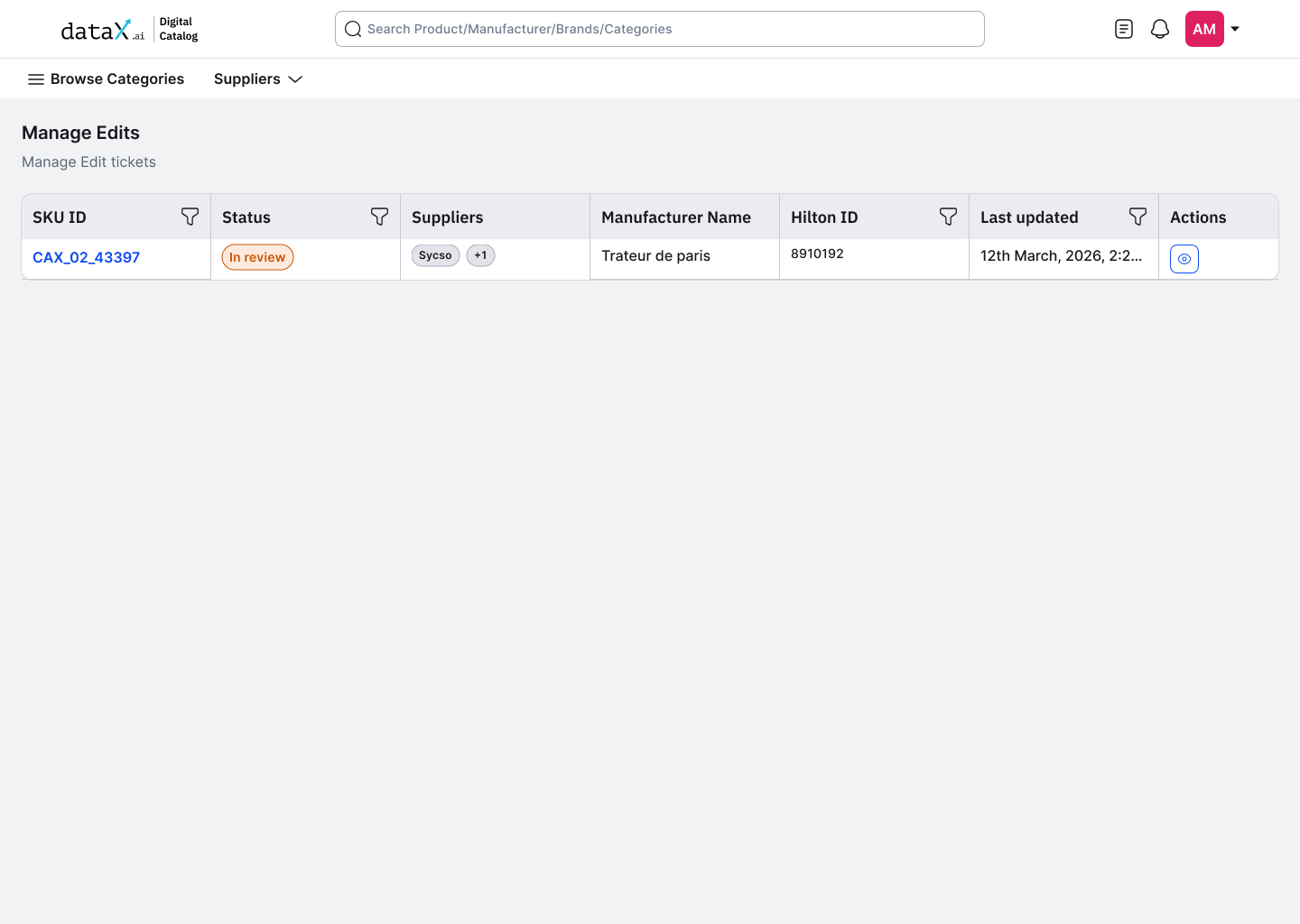
The reviewer sees a queue of pending edit tickets, SKU ID, status, supplier, and timestamp. One click opens the full submission. Every pending edit is visible, nothing gets lost in email threads or support tickets.

Manage Edits queue, pending submissions with status and supplier context
EF-04 · MANAGE EDITS QUEUE Manage Edits queue, pending submissions with status and supplier context
Manage Edits queue, pending submissions with status and supplier context.

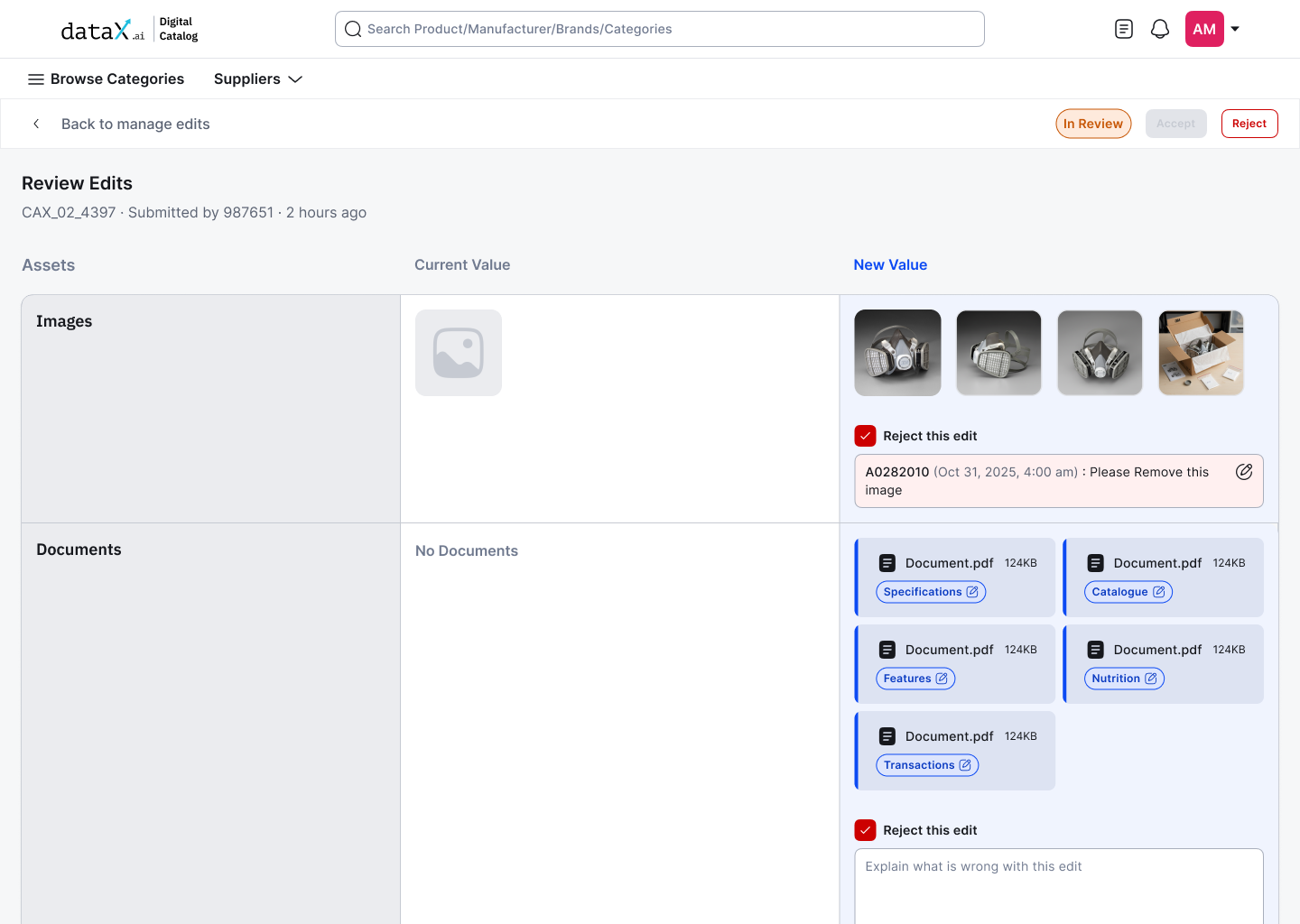
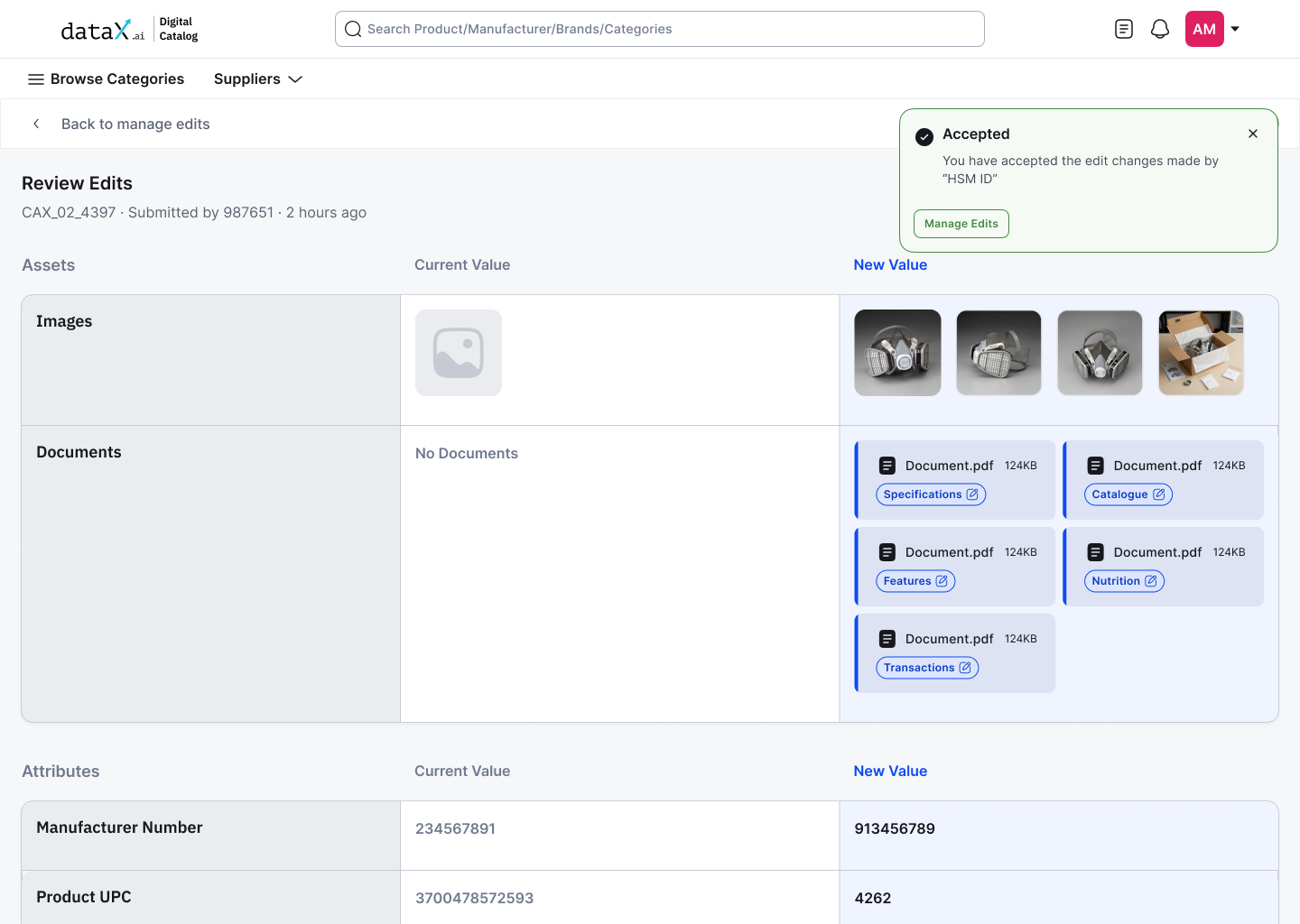
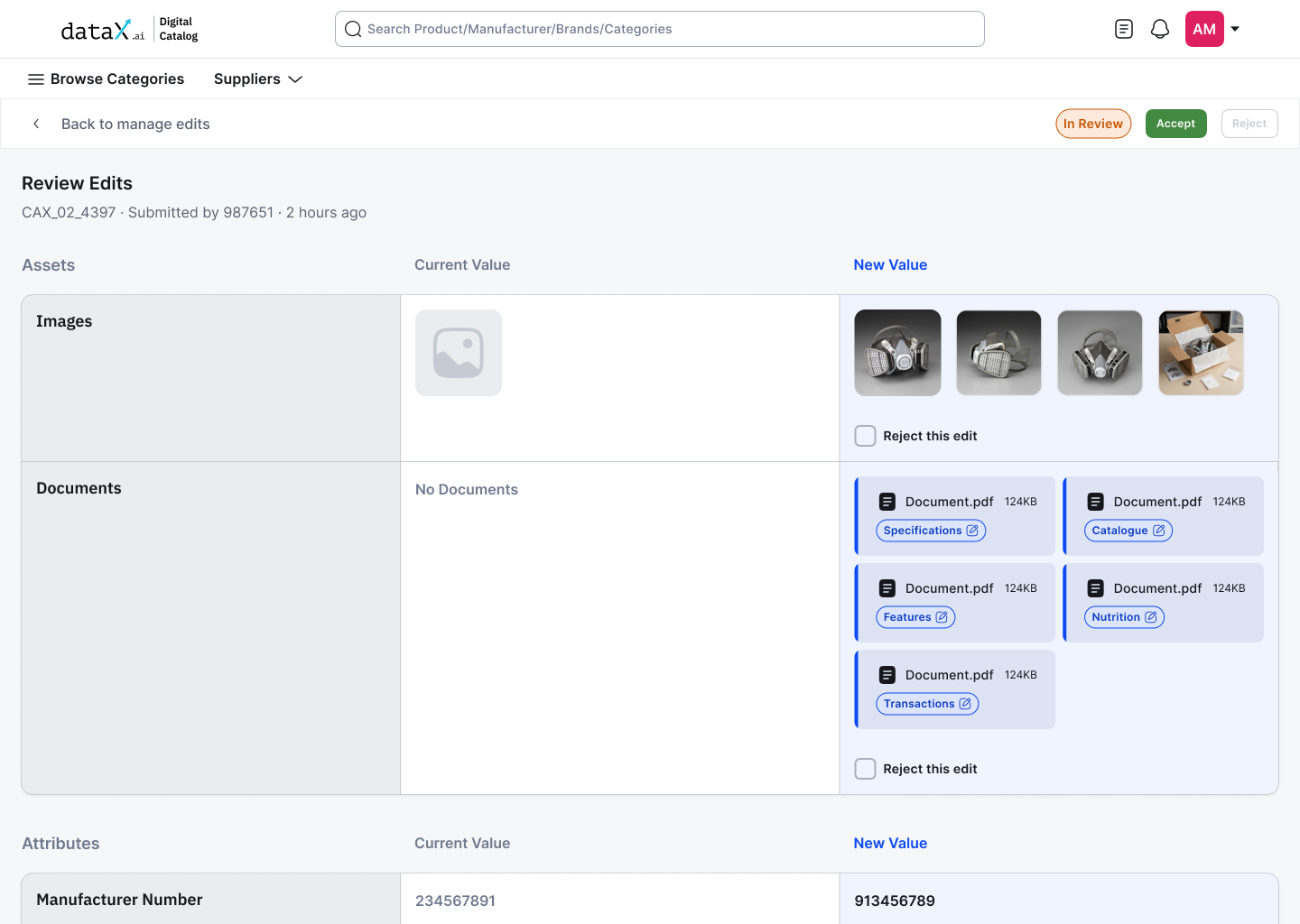
The review screen shows current value vs new value side by side for every attribute, images, documents, and all editable fields. The reviewer works through each field individually, not the submission as a whole.

Review Edits screen, current vs new value side by side, Reject checkbox per field
EF-05 · REVIEW EDITS Review Edits screen, current vs new value side by side, Reject checkbox per field
Review Edits screen, current vs new value side by side, Reject checkbox per field.

Checking 'Reject this edit' on any field reveals a comment box, the reviewer explains exactly what's wrong with that specific field. Multiple fields can be rejected with separate comments. The global Reject button only activates once at least one field is flagged, you can't accidentally reject without flagging something first.

Field-level rejection, comment box reveals on checkbox, specific feedback per attribute
EF-06 · FIELD REJECTION Field-level rejection, comment box reveals on checkbox, specific feedback per attribute
Field-level rejection, comment box reveals on checkbox, specific feedback per attribute.

Accept

All non-rejected fields go live immediately. Audit log captures the decision.

Reject

Submission sent back to editor with field-level comments. Editor knows exactly what to fix and where.

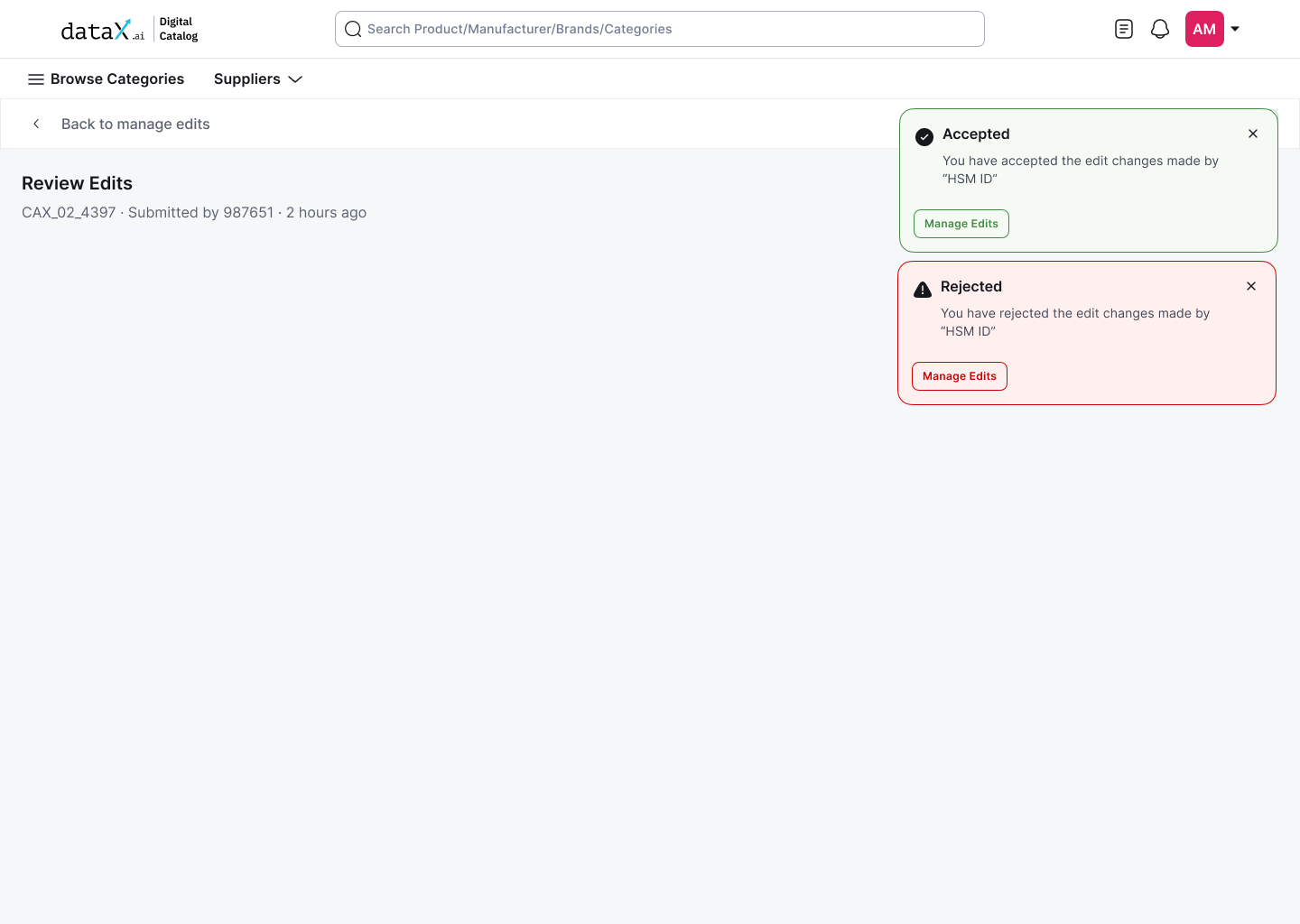
Accepted and Rejected confirmation states, clear outcome, Manage Edits CTA
EF-07 · CONFIRMATION Accepted and Rejected confirmation states, clear outcome, Manage Edits CTA
Accepted and Rejected confirmation states, clear outcome, Manage Edits CTA.

The reviewer doesn't reject submissions. They reject specific fields, and tell the editor exactly why.

Linear by design.
Until the data is right.

The flow is deliberately linear, no branching, no parallel paths. If rejected, it loops back to step 1. The editor re-edits based on field-level feedback and resubmits. The loop ends when the data is right, not when patience runs out.

01
Editor edits
Inline on PDP
02
Preview
Self-review
03
Submit
To reviewer
04
Review
Accept or reject
05
Live
On accept
Final acceptance, changes live, audit log entry created
EF-08 · FINAL ACCEPTANCE Final acceptance, changes live, audit log entry created
Final acceptance, changes live, audit log entry created.

A multi-team escalation became a 2-role self-serve workflow.

> CHAPTER · OUTCOMES

What this design replaces.

What this design
replaces.

BEFORE
  • No edit access on PDP
  • ~5 days to correct a single record
  • 40+ steps across 3 internal teams
  • No accountability trail
AFTER
  • Edit button on every PDP
  • ~30 minutes per submission (projected)
  • 4 steps across 2 client roles
  • Full audit log per change
40%
Reduction in time to fix bad data
Projected
60%
Faster review cycles with field-level comments
Projected
3x
Improvement in AI enrichment accuracy
Projected

* In development. Metrics updated post-launch.

What we didn't
get to solve, yet.

No partial acceptance.

Reviewer must accept all or send all back. Backend limitation, granular field-level acceptance is a Phase 2 problem.

No bulk editing.

Power users managing hundreds of products will need bulk correction tools. Single-product editing doesn't scale.

Field expansion owned elsewhere.

Adding new attribute types still requires Taxonomy team involvement. Not in Phase 1 scope.

Phase 1 ships. Phase 2 learns. That's how good products grow.

Designing within constraints isn't compromising, it's collaborating with reality.

The best designers don't ask for the perfect canvas. They ask: what's the smallest, sharpest version of this that solves a real problem today?

This won't win design awards. But it'll quietly improve thousands of catalogue records, and make the AI that depends on them actually useful.

That matters more.

Next case study
Making data consolidation feel safe.

A four-step governed merge & split flow for an AI-powered supplier MDM, designed so nothing in an enterprise system moves silently.

← All work